

“If an AI agent handles Git for you, why bother learning another version control system like Jujutsu?”
That was the most common pushback on my last post, 15 Years of Git, Then Jujutsu: Why I Can’t Go Back. It’s a fair question and an interesting one, so this post is my answer.
I agree that day-to-day version control is a job for an AI agent. That’s exactly how I work. The difference is that the commands my agents run are Jujutsu commands, not Git commands. Having done it both ways, I’m convinced that even when AI does the driving, Jujutsu makes for a much better developer experience, and that the time you spend learning it pays for itself quickly.
Before I make my case, there’s an obvious question to get out of the way: can AI actually handle Jujutsu? I checked with Opus, GPT, Gemini and others. The latest models already know Jujutsu’s core concepts and main commands out of the box, and they can handle everyday operations without loading any extra skills. That said, Jujutsu doesn’t get the first-class support Git does, so you need some configuration to stop the agent from drifting back to Git and to teach it a workflow that suits Jujutsu. Here’s the setup I use.
Git’s Commit Ceremony vs. Jujutsu’s Frictionless Changes
In Git, the basic unit of history is the commit. The standard workflow goes like this: you edit files in the working tree, pick the ones you want and add them to the index, then write a message and create a commit. Only then does anything land in history. A commit is meant to be a finished product, something you craft with care, which is why Git gives you the index as a staging area. Getting from an edited file to recorded history takes a long, rigid sequence of steps. It’s almost a ritual.
So even when you hand Git over to an AI, you still end every task by asking it to “commit this.” Ask for any history operation mid-task and you get the familiar back-and-forth: “You have uncommitted changes. Should I stash them, or commit first?” Each round may only take half a minute or so, but it happens constantly, and it adds up. There’s a cognitive cost too, paid by both you and the AI whether you notice it or not.
In Jujutsu, the basic unit of history is the change. When you initialize a repository, you start out in an empty change. Every edit you make there is saved as a new revision of that change as you go1. You can add a description, Jujutsu’s equivalent of a commit message, whenever you like. A change never has a moment where it’s officially “done”2. When you finish the work, you simply move on.
That means when an AI handles Jujutsu for you, all it takes is one standing instruction to start each task in a new change with a description3. After that you just say “build feature X,” and your history gets split into sensible units that follow the flow of the work. No more “commit this” at the end of every task, and no more being asked to tidy up your working copy before a history operation.
Jujutsu is compatible with Git, but there’s no index between your working directory and your local repository. On top of that, the state of your working directory is the current point in history (Jujutsu calls this “working copy as a commit”). In Git, humans and AI alike have to track three states for every change to a file. In Jujutsu, there’s normally just one. Only after switching did I realize how much extra mental effort I’d been spending to fit Git’s way of doing things, and how stressful all that bookkeeping had been.
Some of you will say this doesn’t bother you at all. Fair enough. Plenty of people genuinely don’t mind putting on a suit and getting to the office by 8:30 every morning. But imagine moving from that to a job with no dress code, flexible hours and remote work up to three days a week, and finding it so comfortable you could never go back. That’s what the switch felt like.
Jujutsu Makes AI Mistakes Easy to Undo
Humans make mistakes, and so does AI. I still see the occasional report of an AI agent deleting files someone was working on, with no way to get them back. Ask an agent to resolve a conflict and it’s not unusual to get a result that passes the tests but is semantically broken. And since you instruct agents in natural language, a prompt doesn’t always get your intent across, so you’ll often be unhappy with what comes back.
When the AI is running Git commands as part of its work, recovering from a bad result gets dramatically harder. Git has no way to roll the entire repository back to how it was before a given operation. As I mentioned, Git keeps state in several places: the working tree, the index, the stash and commits, and each one is protected in its own way, if at all. Rebase, amend and squash don’t modify existing commits. They create new ones and repoint the branch, so the originals are no longer referenced by any branch. They’re still in the reflog, but finding the right entry after the fact, buried among everything else, is a real chore.
To make up for Git not saving uncommitted changes, Claude Code offers a /rewind command that rolls the code back to an earlier point along with the conversation. But it doesn’t mix well with an agent that runs Git commands. Your files go back, but Git’s state doesn’t, so git status suddenly shows a pile of changes you never intended, and you’re back to cleaning up history. Anything changed by shell commands, by you, or by other agents running in parallel doesn’t get rolled back at all.
If you catch a mistake right away, you’re in decent shape. More often, though, it surfaces later, when you run the tests after more work or when you review things days afterward. By then it’s much harder to untangle. More operations have piled up on top of the bad one, and even if you go all in on the reflog, there’s no guarantee that a long series of delicate steps will actually fix things. Worse, Git gives you no way to undo a recovery attempt itself. An AI trying fix after fix to dig itself out can easily make things worse.
Jujutsu takes care of almost all of this. As a rule, the result of any jj command can be rolled back with jj undo, and the undo itself can be reversed with jj redo. That’s possible because Jujutsu keeps a record of every operation that changes the repository, the operation log, separate from the regular log. Each entry in the operation log is tied to a snapshot of the repository as it stood when that operation finished. You can restore the files to that state, or reverse just the effect of that one operation while keeping everything that came after it.
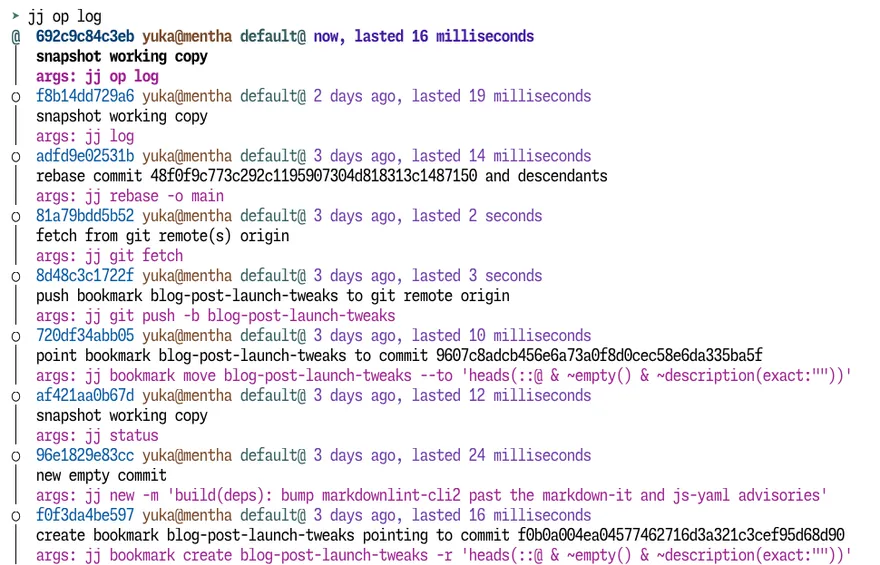
Every jj command an AI runs during a long session of trial and error ends up in the operation log too. When something goes wrong, you can look over everything the AI did, pin down the cause, and go back to the state just before things went sideways.
And unlike a Git commit hash, which changes every time you edit the commit, a Jujutsu change-ID stays the same no matter how many times the change is revised. You can browse a change’s revision history in the evolution log, and with a little digging, you can trace it back and restore an earlier version’s contents. Narrow it down by timestamp or diff, and you can even recover from a botched conflict resolution from several days ago and redo it.
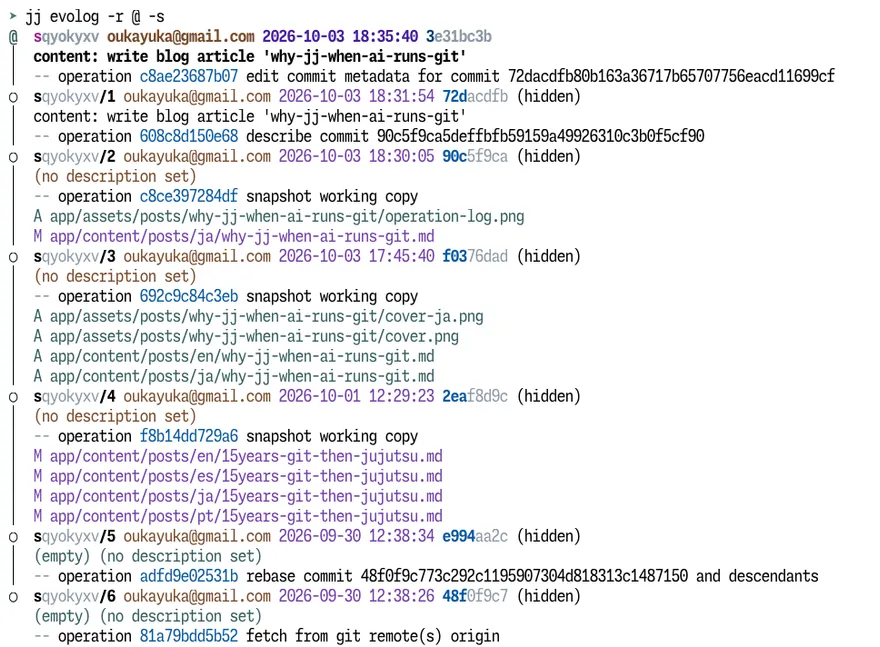
Every edit gets saved to history as you go. The operation log and the evolution log let you find where things went wrong and go back to that point. And if the recovery itself goes wrong, jj undo and jj redo let you try again right away. That’s a level of safety Git simply doesn’t offer, and it’s exactly why I can hand version control to an AI more casually, and more boldly, with Jujutsu than I ever could with Git.
Why Clean History Matters More in the Age of AI Coding
Another comment that stood out on my last post was “I don’t care about keeping a clean history, so I don’t see the point of Jujutsu.” The reasoning seems to be that even if the history is a mess, you can just ask AI to dig out whatever you need. But is that really true? I’d argue the opposite: precisely because AI means we write and read less code ourselves, a clean history matters more than ever.
Coding agents have improved so much that plenty of developers now barely write code themselves, and don’t read every line the AI generates either. Even so, they still guard the quality of what ships, by having an agent running a different model review the work, or by checking the critical parts, like data structure changes, themselves. If you can trace what changed, why, and what it depends on straight from the history, all of that gets faster and less error-prone. Precisely because nobody is reviewing every line, your commit history needs to work as a table of contents for the code, so you can find the parts that matter. A string of giant commits with no clear intent forces the AI to pull irrelevant context in every time, which burns tokens and can hurt the quality of its work.
At the start of each session, an agent will usually look at the most recent meaningful diffs before it looks at the working directory as a whole. Cram “a bug fix + a dependency update + some unrelated content + an unrelated refactor” into a single commit, and the agent gets confused. Line up commits of sensible size with clear intent, in an order that reflects cause and effect, and even a short prompt gives the agent the context it needs for the next task.
And even if you barely read AI-generated code during development, an incident will force you to read it carefully. The first question in a production outage is “when and where did the bad code get in?” When every minute counts, a history of semantically coherent commits helps you pinpoint the problem fast.
AI coding has also created a new problem as productivity has shot up: PRs get huge → they get hard to review → unmerged PRs pile up waiting for review. Now even teams of just a few people are stuck in that loop. Big tech companies like Google and Meta have been dealing with this problem for more than a decade, and their answer has been to “split PRs into small units that depend on each other.” Say you’d normally submit a whole feature as one PR. Instead, you split it into “1. model layer changes,” “2. scheduled job changes,” “3. server API changes” and “4. web frontend changes,” and stack them 1 → 2 → 3 → 4. Each can be reviewed, approved and merged on its own, but a PR can only be merged once the PRs below it in the stack (for 3, that’s 1 and 2) have merged. These companies built that into their tooling and ran it as part of everyday development.
Small PRs with a clear, logical role are easier on reviewers, and it’s easier to spot the ones that are yours to review. Changes to a PR branch lower in the stack propagate automatically to the branches above it, rebased by the tooling. And thanks to the dependencies, you can safely start on the next piece of work while the first PR is still waiting for review. This is what’s commonly called stacked diffs or stacked PRs. Graphite, GitButler, GitLab and others have been rolling out support for years now. And in July 2026, GitHub finally launched stacked PRs in public preview. With the biggest player on board, the trend looks set to pick up speed.
Between monorepos becoming the norm and the impact of AI agents, demand for stacked PRs is growing not just at big companies but at small and mid-sized ones too. Once stacked PRs are part of how a team works, getting the units of history and their order right becomes part of every developer’s job. PRs you could once stuff with anything now have to be split by logical role, with dependencies between them. And Jujutsu makes that easy and safe.
Take splitting a giant commit into meaningful units. It’s a hard task, even for AI. In Git, you’d probably git reset HEAD^ to dump the whole commit back into the working tree, then repeat the index-then-commit cycle piece by piece. Slip up along the way, and recovery means figuring out exactly how far you got with the split and which edits are left where—a headache in itself. If you’re splitting an older commit, you’re in for the thrill of repeated rebases with a detached HEAD. In Jujutsu, you pass the files to jj split -m <description> and you’re done. Get it wrong, and you undo and try again. When an AI does these, the split works at the file level, but a human running Jujutsu can use jj split -i to split interactively line by line, or consult the evolution log and split the work in the order it was actually done.
Turning a working branch into a chain of dependent branches for a stacked PR is a real hassle in Git. In Jujutsu, you just put bookmarks, one after another, on a single line of history. GitHub’s own docs even walk through building a stacked-PR branch chain with Jujutsu4. It’s nice to see the fit recognized officially.
What’s Easy on Humans Is Easy on AI Too
Git was designed with features first. Jujutsu is a version control system built to fix Git’s pain points5 and to keep the cognitive load on humans as low as possible. What’s easy on human minds turns out to be easy on AI as well. You never have to worry whether an edit has made it into history, because the state of the working directory is the current point in history. A change keeps the same ID however many times it’s revised, so it never gets lost during long rounds of trial and error. The operation log records every operation in order, so it’s easy to see which step went wrong and restore from there. And when a conflict comes up mid-task, the conflicted state itself is saved to history, so you can take your time and try resolving it as many times as you need. Every one of these is a big advantage when AI is the one at the controls.
Jujutsu doesn’t get the same first-class support from AI agents that Git does. But it’s far easier for them to reason about, and that tends to make their work more stable and safer. Even if you’re handing version control to AI along with the coding, choosing Jujutsu for the job just makes sense.
That’s my take, and it’s also the argument I develop in “Chapter 1: What Kind of Tool Is Jujutsu?” of my book, Juju-chu! — Starting Your Jujutsu × AI Workflow with `jj new`. The chapter walks through the same argument feature by feature. “Chapter 3: Jujutsu × AI Workflow in Practice” is a hands-on walkthrough of actually handing Jujutsu over to Claude Code and Codex.
Juju-chu! — Starting Your Jujutsu × AI Workflow with `jj new`A hands-on book on adopting Jujutsu (jj) with Claude Code and Codex: automatic snapshots, undoable operations, and safe history rewriting.
If this post got you curious about Jujutsu, take a look.
Footnotes
-
To be precise, whenever any
jjcommand runs, Jujutsu checks the working copy against the latest state in history. If they differ, it takes a snapshot and the change gets a new revision. If you use a Jujutsu UI tool, it usually takes a snapshot automatically whenever you view the history there. ↩ -
One catch: a change with no description can’t be pushed to the remote. ↩
-
Solving Git’s Pain Points with Jujutsu (with Martin von Zweigbergk) - YouTube ↩