

Jujutsu Has No Branches?
When I started using Jujutsu with a brain trained by years of Git workflows, the first thing that threw me was that there was no branch for my current work to belong to. Every Git beginner learns the drill: before you do any real work, create a branch. Even on a casual side project where you skip that step, you’re at least on the main branch.
Yet the official docs and the well-known tutorial just dive straight into the work. Nobody creates a branch or switches to one. In fact, no matter where I looked, I couldn’t find anything in Jujutsu called a “branch” that you could actually operate on. Instead there’s this thing called a bookmark, which gets mapped to a branch when you work with Git. And yet a bookmark is apparently not the same thing as a branch. I had no idea what was going on.
After I’d pushed my Jujutsu work and opened PRs from it a few times by following the guides, though, something occurred to me: maybe Git and Jujutsu simply mean different things by the word “branch.” With that in mind, I reread the branching chapter of Pro Git1 and the bookmarks page in the Jujutsu docs, and it finally clicked. A Git branch isn’t a “branch” in the literal sense, and there’s good reason Jujutsu calls its counterpart a “bookmark.”
What “A Git Branch Is a Pointer” Actually Means
So what exactly is a Git branch? Section 3.1 of Pro Git, cited above, describes branching this way:
Branching means you diverge from the main line of development and continue to do work without messing with that main line.
Read a little further and you’ll find this:
A branch in Git is simply a lightweight movable pointer to one of these commits.
[…]
What happens when you create a new branch? Well, doing so creates a new pointer for you to move around.
“A branch is a pointer.” If you’ve used Git for any length of time, you’ve heard that line. Embarrassingly, it never meant much to me, and for years I used branches by feel. I can see why now. The explanation rests on several unstated assumptions, and for people whose first VCS was Git, it doesn’t tell you much. Git’s official documentation and the classic books were written by veterans who knew other version control systems well, and it’s easy for them to overlook that people who started with Git don’t share those assumptions.
So what do you need to know before “a branch is a pointer” makes sense? The first thing is that in Git, a branch is not the split in history itself. To keep the two apart, Pro Git uses phrases like “divergent history” for the split itself2.
Most distributed VCSs represent history as a DAG3 rather than a tree, so splits and merges are expressed entirely within the graph. Where VCSs differ is in the mechanism they give users to see and work with those splits, and most of them call that mechanism a “branch.” In Mercurial, which appeared around the same time as Git, a branch is metadata permanently embedded in every commit on a given line of history. Git, by contrast, uses one pointer per line of history, each pointing to a single commit.
Still fuzzy? Then let’s move on to the second assumption. What sets Git apart from other VCSs is that wherever you are, you always get pushed to the tip of history automatically. In earlier VCSs, creating and switching branches were heavy operations that seriously slowed down large projects like the Linux kernel. Making them blazingly fast was a key goal when Git was designed. The answer was to make a branch a movable pointer to a single commit, stored in a text file of just a few dozen bytes.
To make that work, Git expects you to edit code on the line of work some branch points to, and the branch pointer automatically moves to each new commit. Switching branches means making HEAD, the pointer to where you currently are, line up with that branch. So in Git, wherever you go, you always end up pushed to the tip of history.
Since Git was the only distributed VCS I knew, I assumed that’s simply how distributed VCSs work. Learning that this behavior is specific to Git, and understanding the machinery behind it, finally brought “a Git branch is a pointer” into focus.
What Happens to a Split in History Without a Branch?
So can Git have a split in history that isn’t a branch? It’s actually easy to make one: check out a past commit by its hash.
$ git checkout 9effb1cc737824d9c14e1a8ecbb725e44ccae104Note: switching to '9effb1cc737824d9c14e1a8ecbb725e44ccae104'.
You are in 'detached HEAD' state. You can look around, make experimentalchanges and commit them, and you can discard any commits you make in thisstate without impacting any branches by switching back to a branch.⋮HEAD is now at 9effb1c create b.txt
$ echo '444' > d.txt$ git add .$ git commit -m 'create d.txt'[detached HEAD 46b43c3] create d.txt 1 file changed, 1 insertion(+) create mode 100644 d.txt
Git goes out of its way to tell you that you’re now in a detached HEAD state. Normally HEAD points to some branch. When HEAD points directly to a specific commit hash instead, that’s called detached HEAD. Stacking commits in this state is considered risky and best avoided, because that history ends up like this:
- You can’t find it later
- It’s treated as garbage and eventually deleted
- You can’t share it with others
In Git, commits only become traceable by humans once they belong to a branch or a tag. Commits you make in detached HEAD lose their reference the moment you switch branches, and they don’t show up even in git log --all. The reflog is your only way to get them back. The system also treats them as unneeded history and makes them eligible for garbage collection, so once the expiry period passes, they’re gone for good. Commits that you can easily lose track of yourself, and that could vanish at any time, are naturally hard to share with anyone else.
Why Jujutsu Has Bookmarks Instead of Branches
As I mentioned at the start, Jujutsu has nothing called a “branch” that you can operate on. Yet the word “branch” shows up all over the Jujutsu docs, in its literal sense of a split in history. Jujutsu has no concept of a “current branch,” and no dedicated mechanism for identifying splits in history, so “branch” is used in its plain, original meaning.
So why doesn’t Jujutsu have branches like Git and Mercurial do? In Git, amending or rebasing a commit gives it an entirely new hash. Hashes that keep changing are hard for both the system and humans to follow, so a commit needs to belong to a branch: a stable named label that says which line of work it’s on. In Jujutsu, on the other hand, the basic unit of history, the change, carries an immutable change ID separate from its commit ID, which changes whenever the change is revised. However many times you rewrite its contents or rebase it, you can track a change by the same ID, so there’s little need to label every line of work.
Splits in history are also always visualized in the log as an ASCII-art graph. Between the tree graph you can see in the log and the descriptions of the changes that form its nodes, it’s obvious at a glance which line of work each change belongs to. And any change that has a description or modifies files stays in your history until you explicitly abandon it.
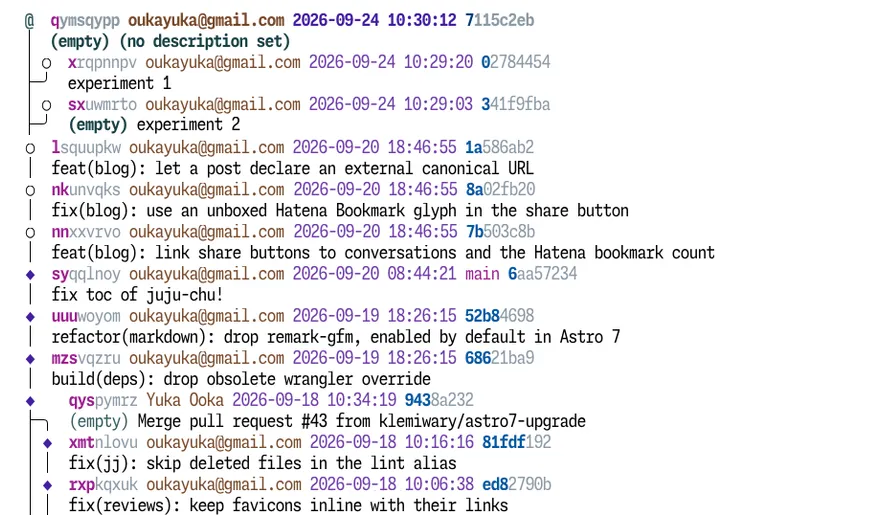
With no named branches, the normal way to work in Jujutsu is in the equivalent of Git’s detached HEAD. Jujutsu calls this an anonymous branch. Detached HEAD is considered dangerous, but Jujutsu’s anonymous branches don’t have the first two problems it has in Git: “1. You can’t find it later” and “2. It’s treated as garbage and eventually deleted.” What about “3. You can’t share it with others”? That’s what Jujutsu provides bookmarks for.
A bookmark is a named pointer attached to a change. Both are named pointers, but unlike a Git branch, a bookmark is purely a marker for sharing with others or for reminding yourself, with no direct connection to splits in history. That’s why you can put multiple bookmarks on the same line of work, and also why, when you add new history on top, a bookmark doesn’t automatically move forward the way a Git branch does.
Jujutsu sees no need to name splits in history, or to designate an entire diverging line of work just to share history with others. That’s why Jujutsu has bookmarks instead of branches.
Anonymous Branches + Bookmarks: Where VCS Evolution Landed
In Git, both creating splits in history and merging them basically happen at the branch level. So how does Jujutsu, with no branches, handle them?
In Jujutsu, the command that creates a new change, the basic unit of history, is jj new. How do you create a split in history? Pass jj new the ID of a change that already has a child. How do you merge diverging history? Pass jj new the IDs of the changes you want to merge. In Jujutsu, extending history, branching, and merging all work at the level of the change, and remarkably, they’re all the same basic operation: creating a new change.
You keep working like this until you reach a stopping point. Time to open a PR. This is the first time you actually need to give that line of work a name4. Set a bookmark on a change and push it, and the whole series of changes from where it split off from main up to that change gets registered in the remote Git repository as a branch, with each change mapped to a Git commit.
So what do you gain when the unit of sharing isn’t tied to branches? First, flexibility: you can start working without deciding on a name or on what to share, and settle those questions only when it’s time to share. Second, it makes a series of dependent PRs easy to build, which has recently become a lot more valuable. GitHub’s stacked pull requests, which let you split a PR into small units with parent-child relationships, finally became generally available on October 6, 20265, and Jujutsu bookmarks make them very easy to work with. To build stacked PRs with Git, you create the first branch with gh stack init, create a child branch with gh stack add each time you finish a chunk of work, and finally push and open the PRs with gh stack submit. It’s a fairly involved process that leans heavily on dedicated tooling. With Jujutsu, you put bookmarks on your line of work in order, push, and run something like gh stack link <bookmark1> <bookmark2> <bookmark3>. That’s it. It’s almost anticlimactic.
Without branches, Jujutsu has rethought the operations Git built around branches, so you can work in smaller and more flexible units. After living with branchless Jujutsu for a while, I finally understood what Git branches are, after years of using them with only a fuzzy idea. And then Jujutsu’s concepts, so different from Git’s, started to look surprisingly rational. That feeling gets even stronger when you step back and look at the history of VCSs.
I mentioned earlier that Mercurial has a different kind of branch from Git’s. But since Mercurial branches are permanent, global data embedded in every single commit, they’re a poor fit for feature work or bug fixes that wrap up in a few days. So bookmarks were added later for lightweight work: pointer-style markers you could use to hand off work on push, or to mark where you’re currently working. Modeled on Git branches, yet independent of branches and built for sharing. That’s where Jujutsu’s bookmarks come from.
Jujutsu takes this one step further: it treats branches as unnecessary for splits in history and doesn’t have them as a feature at all. Interestingly, Sapling, which Meta forked from Mercurial and developed on its own, also has bookmarks and no branches. You could say that “anonymous branches + bookmarks” represents one destination in the evolution of version control, from Git through Mercurial to Jujutsu.
One last note: this post is based on sections “2-4-2. The Difference Between Branches and Bookmarks” and “2-4-3. Working on Anonymous Branches” of my book, Juju-chu! — Starting Your Jujutsu × AI Workflow with `jj new`.
Juju-chu! — Starting Your Jujutsu × AI Workflow with `jj new`A hands-on book on adopting Jujutsu (jj) with Claude Code and Codex: automatic snapshots, undoable operations, and safe history rewriting.
The early chapters of the book focus on the difference between Git’s and Jujutsu’s mental models. Besides branches versus bookmarks, they carefully walk through the other places where newcomers tend to stumble. If this post made you want to try Jujutsu, or to give it another shot after bouncing off it once, take a look.
Footnotes
-
An open-source book on Git by Scott Chacon and Ben Straub, also used as Git’s official documentation. It’s available free online. https://git-scm.com/book/en/v2 ↩
-
https://git-scm.com/book/en/v2/Git-Branching-Branches-in-a-Nutshell#divergent_history ↩
-
Short for Directed Acyclic Graph: a graph structure in which nodes connected by directed edges never form a cycle. ↩
-
If you’d rather name things up front, you can of course do that too. Create a bookmark with
jj bookmark createwhen you start working, then move it to the target change withjj bookmark moveorjj bookmark advancebefore you push. ↩ -
Stacked pull requests generally available - GitHub Changelog ↩